Map, yardage, and score together
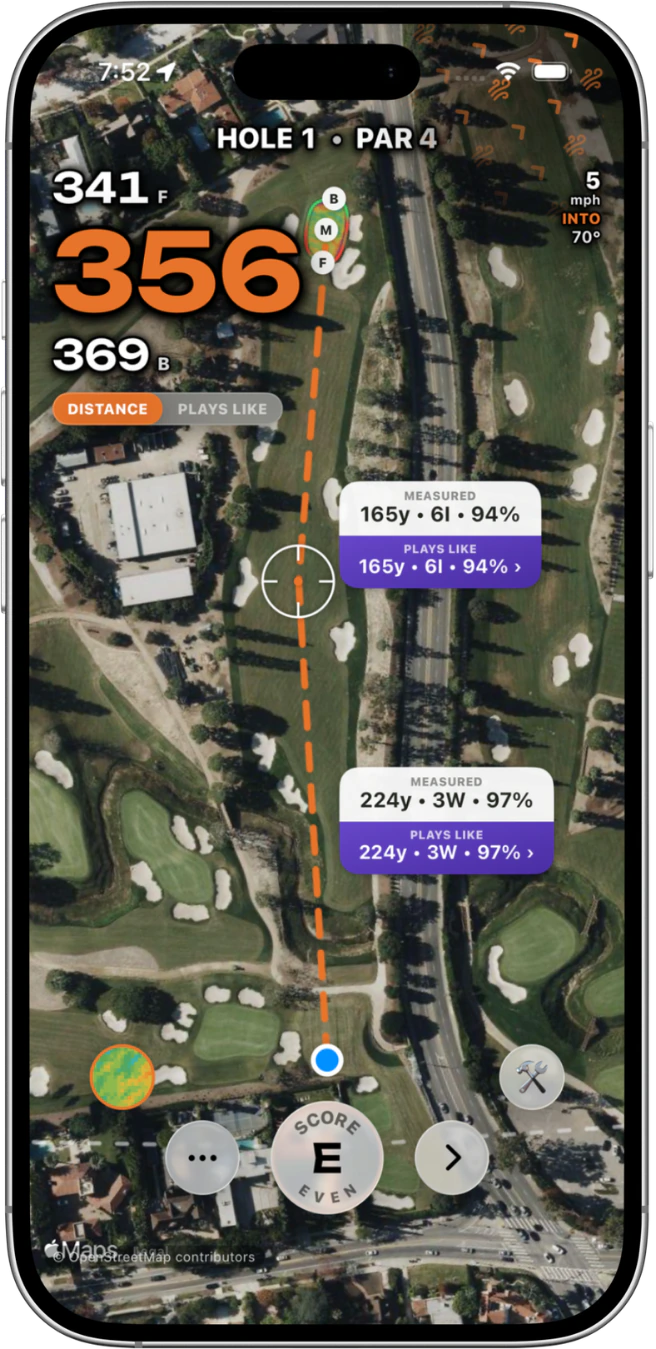
Play from a live satellite map with front, middle, and back yardages and your scorecard on the same screen.
Course GPS · Beta
Grassy brings live front, middle, and back yardages, hazard and layup planning, plays-like guidance, club suggestions, and scoring into the same social app you use to rank courses, follow friends, and decide where to play next.
No GPS subscription required · Course GPS is in beta · Grassy is currently on iPhone · Course eligibility and advanced map detail vary
Built for the decision in front of you
The live satellite map helps you read front, middle, and back distance, choose a hazard or layup target, understand both legs of the shot, and keep the score moving.
Play from a live satellite map with front, middle, and back yardages and your scorecard on the same screen.
Switch views to account for available wind, elevation, temperature, and altitude when those conditions can be resolved.
Drag a target to any layup or hazard point, read golfer-to-target and target-to-green distances, use adaptive arcs, and see a club suggestion when your bag is configured.
Reframe the hole from above or move into a 3D flyover to understand shape, landing areas, and the route to the green.
Where available, explore interactive 3D hole terrain and 3D LiDAR Green Books with slope heat and break-direction arrows.
Review your own hole history, set today’s pin, optionally auto-advance, add notes, and see weather when it is available.
More than a rangefinder
A course is not just today’s yardage. It is where it sits on your list, what your friends thought, the holes you remember, and the next place you want to play.
Straight answers
Yes. No GPS subscription is required. The Course GPS Beta planning tools are included for everyone in Grassy.
Grassy does not make a universal coverage claim. A GPS round depends on course geometry and scorecard availability. Interactive 3D terrain and LiDAR-derived green maps appear only on supported courses.
When the required information is available, plays-like distance can account for wind, elevation, temperature, and altitude. You can switch back to measured distance at any time.
No. Automatic shot tracking is not a current Course GPS claim. Grassy currently focuses on live distance, visual planning, scoring, terrain, and round context.
Grassy does not promise offline satellite maps. Plan on having a data connection for the complete map experience.
Course GPS lives in the same app as your ranked course list, friend activity, lists, notes, and course discovery. The round becomes part of a longer course story instead of a separate utility.
Not currently. Grassy requires an iPhone with iOS 18.0 or later and does not claim Android, Apple Watch GPS, or Wear OS GPS support.
Yes. During an eligible Course GPS Beta round, you can drag a target to a hazard or layup point and see golfer-to-target plus target-to-green distances. Adaptive arcs and club suggestions are included as well.
Supported courses can include interactive 3D hole terrain and 3D LiDAR Green Books with slope heat and break-direction arrows. This detail is included for everyone where supported, but it is not universal.
Ready for the next round
Download Grassy on iPhone, open an eligible course, and start a Course GPS Beta round. All current Course GPS Beta planning tools are included for everyone.
Official sources